
Gather all your Google Ads data into one easy-to-understand dashboard.

Google: the search engine to end all search engines. Naturally, advertising with Google Ads is a necessity for any efficient digital marketing campaign. By targeting customers through keywords and pinpointing those that are searching for what you have to offer, you can find your most promising leads at the very moment that they’re searching for a service or product like yours. A Google Ads dashboard helps you stay on top of your Google Ads campaigns in finding just the right keywords for just the right audience. The DashThis Google Ads integration also allows you to track Local Search Ads (LSA), giving you deeper insights into your local campaigns.
-
72 +
Preset Widgets
-
82 +
Metrics & Dimensions
-
2 +
Dashboard Templates
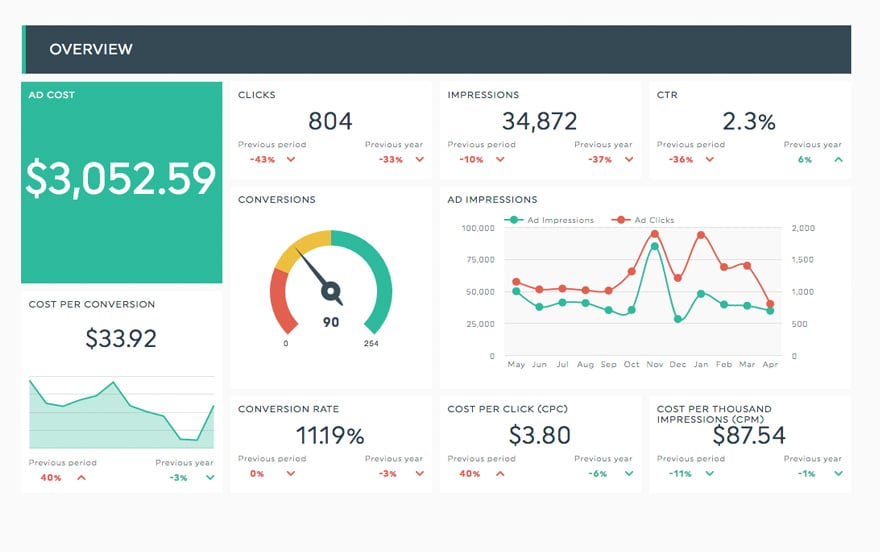


 Connect multiple Google Ads accounts
Managing several clients? You can easily connect multiple Google Ads accounts to your DashThis dashboards and keep all your campaign data organized in one place.
 All your preferred KPIs
Get a quick real-time access to all your most important Google Ads campaign performance metrics; ad group performance, landing page performance, click-through rate (CTR), Cost per Click (CPC), conversion rate, search queries, track your Google ads campaigns at a glance.
 All your data sources
Google ads is just one of the many platforms you use for digital marketing: Google Analytics, Google My Business, Google Search Console, Facebook, LinkedIn, Youtube, Hubspot... With DashThis, you can gather all your online marketing platforms' key metrics in the same report!
 Completely automated
We do the heavy-lifting! No more fetching Google Ads data and copy-pasting in excel spreadsheets or Google sheets, the entire process is automated!
 Multiple sharing options
Share your reports with your clients in seconds with automatic email dispatches, easy-to-share URLs, and printable PDFs. The choice is yours!
 Your own templates
Don't start your dashboards from scratch ever again; choose from one of our preset templates or create your very own report template in seconds! It's like starting with the perfect ad performance dashboard example.
Available Preset Widgets
Featuring the most common KPIs, these widgets are ready to use! Drag, drop, done! It's data visualization made simple.
-
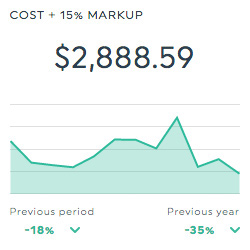
Cost + 15% Markup
This historic widget shows the amount you spent on clicks and impressions for your ad, plus an additional 15% markup (so that your clients can see their true expenditure).
-
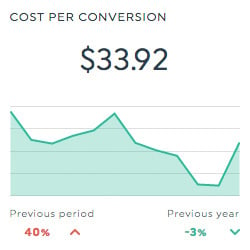
Cost Per Conversion
This historic widget shows the average amount you spent on each conversion. It is calculated by dividing the total spent by the number of conversions.
-
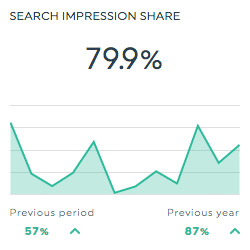
Search Impression Share
This historic widget shows the percentage of impressions that your ads receive when compared to the total number of impressions that your ads could potentially have received. It is calculated by dividing the number of impressions by the total number of eligible impressions.
-
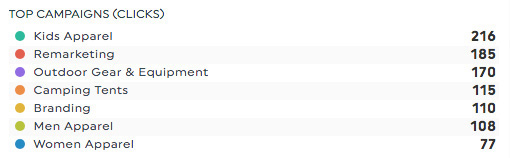
Top Campaigns (Clicks)
This list widget shows you your Google Ads campaigns, in order of number of clicks each received.
Available Metrics, Segments, & Dimensions
These are the top 10 metrics and dimensions users usually include in their Google Ads dashboard:
- Clicks
- This is the number of clicks on your ad.
- Average Position
- This is the position in which your ad typically ranks against other ads.
- Click Assisted Conversions
- This is the total number of conversions for which a specific keyword contributed one or more assist clicks. An assist click is any click a particular keyword received prior to a conversion (therefore, it excludes the last click).
- Average Conversion Value (All Conversions)
- This is the average value attributed to all your conversions. It is calculated by dividing the total conversion value for all conversions by the number of total conversions.
- Cost Per Thousand Impressions (CPM)
- This is the total you spent for 1,000 impressions of your ad.
- Effective Revenue Share (ERS) for Conv.
- This percentage indicates the profitability of your ad campaign. It is calculated by dividing your ad cost by your total conversion value, and then multiplying the result by 100.
- Return on Ad Spend (ROAS in $) for Conv.
- This is the return on your total ad spend. It is calculated by dividing the conversion value by the total ad cost.
- Return on Investment (ROI) for Conv.
- This is the total return on investment of your ads. It is calculated by subtracting the ad cost from the revenue, and then dividing the result by the ad cost.
- Device
- This dimension allows you to isolate your data based on the device the user used to see your ad.
- Keyword
- This dimension allows you to isolate your data based on the keyword used in your ads.
Other Useful Integrations
Get a more inclusive view of your data by including any other integration in your dashboard too, like your ecommerce platforms, social media, or SEO tools:


FAQs about DashThis and Google Ads Integration
Have questions about using Google Ads with DashThis? Here are a few quick answers.
Is Google Ads data uploaded automatically in DashThis?
Yes. Once you connect your Google Ads account to DashThis, your data is pulled in automatically. Your dashboard updates automatically, so you never have to manually export data, copy-paste spreadsheets, or update reports again.
What Google Ads metrics can I track in the dashboard?
You can track all the key Google Ads metrics, including impressions, clicks, conversions, cost, CPC, CTR, conversion rate, cost per conversion, and ROAS. You can also break down performance by campaign, ad group, keyword, device, and more, depending on the dimensions you select.
Can I customize my Google Ads dashboard?
Absolutely. You can fully customize your Google Ads dashboard by choosing the metrics, dimensions, widgets, layout, and visualizations that fit your reporting needs. You can also add filters, comparison periods, goals, notes, and even combine Google Ads data with other platforms like Google Analytics, Facebook Ads, or LinkedIn Ads in the same dashboard.
Can I share my Google Ads dashboard with clients?
Yes. DashThis makes it easy to share your Google Ads dashboards with clients and stakeholders. You can share a live dashboard link, schedule automatic email reports (daily, weekly, or monthly), or export the report as a PDF. You can also set user permissions to control who can view or edit the dashboard.
Can I white-label my Google Ads reports?
Yes. You can fully white-label your Google Ads dashboards by adding your agency logo, brand colors, and custom domain. This allows you to present professional, client-ready reports under your own brand.
Can I combine Google Ads with other marketing data in one dashboard?
Definitely. One of the biggest advantages of DashThis is the ability to combine multiple data sources in a single report. You can display Google Ads alongside SEO, social media, email marketing, and web analytics data to give clients a complete view of their marketing performance.
Learn to use Google Ads in our Help Center
Read about Google Ads on our blog
